


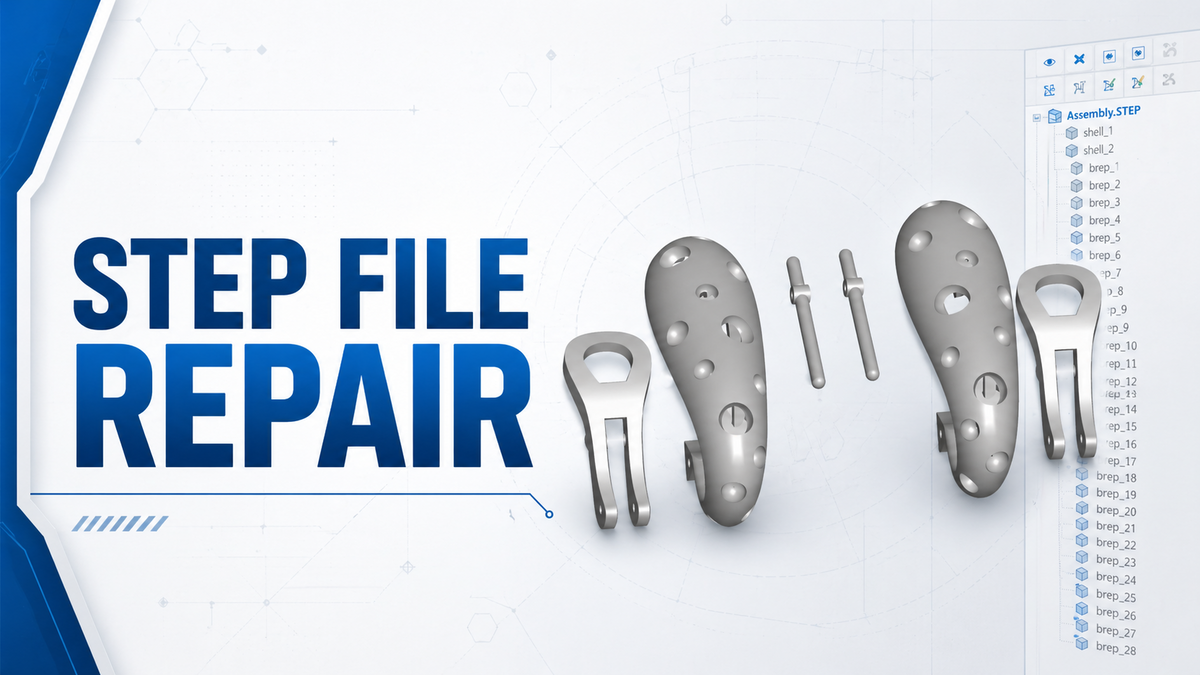
Some technical issues are small, but they can still delay a project by hours if no one identifies the real cause. In a cnc machining project, even a simple file structure problem can affect quotation speed and engineering review.
Recently, we received an inquiry from an Italian customer. The customer sent us a STEP-format 3D file and asked for a machining quotation. At first, it looked like a normal request. We receive similar RFQs every day.
However, when our engineer opened the file in SolidWorks, the model did not appear as one complete solid body. Instead, it came in as dozens of separate bodies. In that condition, the file could not be used directly for process review, machining analysis, or quotation.
If handled in the usual way, the engineer would have to manually repair, align, and merge all of the separated bodies before the model could be used. This would take a long time and would also increase the risk of error.

First, We Confirmed the Customer’s Software
Instead of simply telling the customer that the file had a problem, we asked one important question:
“Which 3D software are you using?”
The customer replied: Rhinoceros 8.
That answer immediately helped us narrow down the issue.

The Real Cause: Missing BooleanUnion Before Export
From experience, STEP files exported from Rhino sometimes appear as multiple separate bodies if the model has not been merged into one complete solid before export. In a cnc machining project, this kind of file structure problem can directly affect process review and quotation efficiency.
In this case, the likely cause was simple:
the customer had not performed BooleanUnion before exporting the STEP file.
The fix was also simple:
- Select all relevant parts in Rhino 8
- Run BooleanUnion
- Confirm that the model becomes one complete solid
- Export the STEP file again
We sent these instructions to the customer so the file could be corrected quickly and used directly for the cnc machining project.

Result: The Whole Process Was Back on Track in 5 Minutes
Only a few minutes later, the customer sent back the new file.
This time, when our engineer opened it, the model appeared as one complete and clean solid body. The machining review and quotation process could continue immediately.
The problem itself was not complicated. But without finding the real cause, both sides could easily have wasted half a day or more trying to repair the file manually.
What This Case Shows
This was a small issue, but it shows something practical:
- not every file problem comes from poor design
- sometimes the real issue is only the export method
- asking the right question first can save hours later
In cross-border technical communication, problems like this are common. A file may look correct in one software environment but become difficult to use after conversion. If the communication is clear and specific, the solution may only take a few minutes.
What We Learned
This case reminded us of three useful principles:
1. Check whether the problem comes from the model or the export method
STEP, STP, and IGES files often behave differently across software platforms.
Before trying to repair the geometry manually, it is often more efficient to confirm how the file was created and exported.
2. Give customers a workable solution, not only a problem report
Saying “the file cannot be used” does not help much.
Telling the customer which command to use and what step to change is far more effective.
3. Small technical support can save a large amount of project time
The customer only needed a few minutes to re-export the file.
But that small correction saved hours of unnecessary repair work and back-and-forth communication.

Final Note
Before machining starts, whether a 3D model can be opened and used correctly often determines how fast a project moves forward.
If you also run into problems with STEP, STP, IGES, or other 3D files—such as:
- multiple separated bodies after import
- incomplete solid models
- missing surfaces after file conversion
- files that cannot be used directly for machining review
feel free to send us the file.
We can first review it from a file structure and manufacturability perspective, then help identify where the issue comes from and what the most direct solution is.


分享:
Case Studies 27 丨How We Solved a Challenging Medical Scissor Machining ProjectCase
Case Study 28 | From Early Design to Stable Production: A Medical Device Parts Story